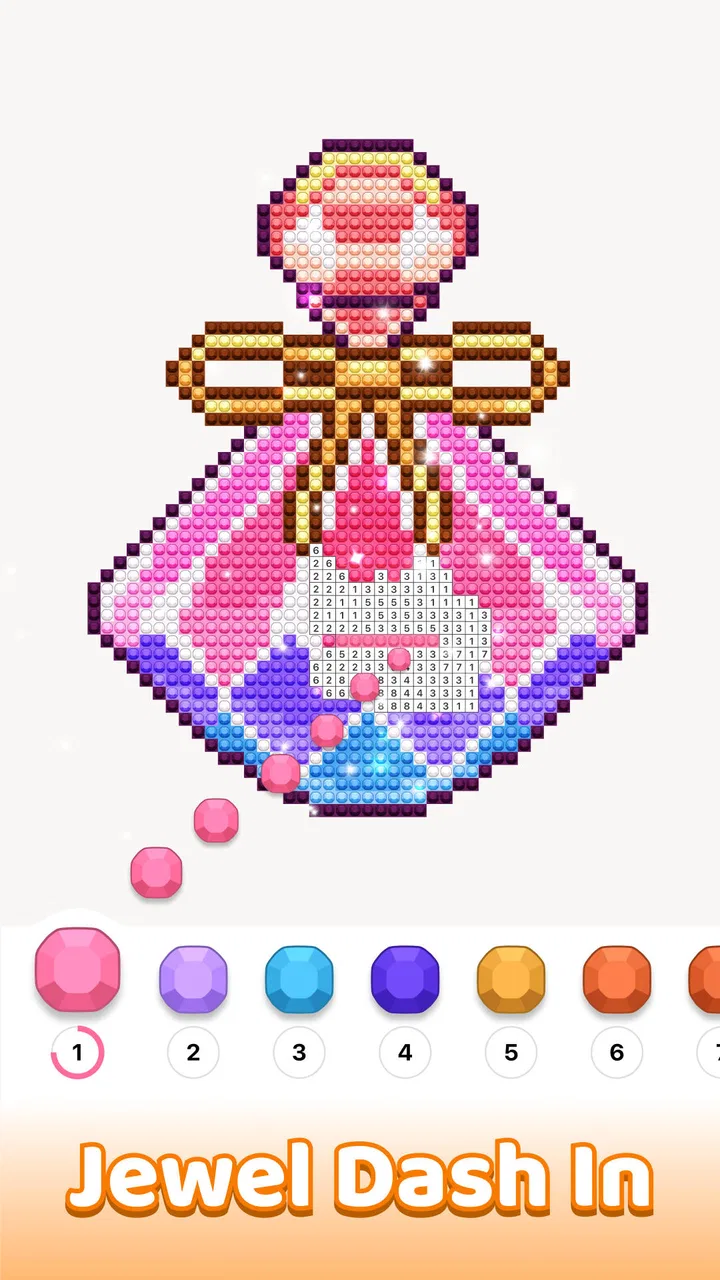
Jewelscapes: Color by Number
- 5.0
- Rating
- 100.00K
- Installs
- Free
- Price

 Analysis by App-foxy
I spent time with Jewelscapes: Color by Number as a quiet, casual game rather than something designed to test reflexes or competitive skill. Its basic appeal is easy to understand: choose a pixel-style jewel image, follow the numbered color guide, and gradually turn a blank design into a finished picture. That simple loop makes it suitable for short breaks, winding down before bed, or giving your hands something gentle to do while your attention settles.
What makes the experience worth considering is not complexity but the way it reduces decisions. You are not asked to invent a palette, learn a long rule set, or react to a timer. I can open a picture, work on a small area, and stop without feeling that I have abandoned a difficult challenge. At the same time, that simplicity also defines its limits. If you want strategy, competition, story, or a strong sense of progression, this casual coloring game may feel too narrow.
Where the experience can get stuck
The first point of friction is knowing how to approach a pixel image without making the screen feel visually crowded. A completed design may look obvious, but an unfinished one can contain many tiny cells and similar-looking numbers. I found it more comfortable to choose one region and finish it before jumping around the canvas. This reduces the time spent hunting for a particular shade and makes progress easier to see.
You May Also Like

 AccuWeather: Weather Radar
AccuWeather Review: A Quick, Clear Forecast for Everyday Decisions
For everyday plans, the best forecast is the one you can understand quickly. AccuWeather makes rain timing, radar, and local conditions easy to act on, with a few trade-offs.

 Hill Climb Racing
Why Hill Climb Racing Still Turns Crashes Into One More Run
A tiny car, a bumpy hill and one more upgrade: Hill Climb Racing keeps resurfacing because its simple chaos makes every near-miss feel personal.

 AliExpress - Shopping App
AliExpress Makes Global Shopping Feel Personal, but Shoppers Bear the Risk
AliExpress turns a global marketplace into a pocket-sized discovery engine. Its reach is useful, its shopping loop compelling, and its trade-offs easy to miss.

 Lords Mobile: Kingdom Wars
Lords Mobile Is a Kingdom-Building Routine, Not a Quick Match
A case-by-case verdict on the building, battles, device demands, and social commitments that make Lords Mobile rewarding for some players and exhausting for others.

 PDF Scanner app - TapScanner
TapScanner Makes Paperwork Easier to Capture, Check, and Share
TapScanner makes scanning with a phone feel less like a rescue operation and more like a dependable step in getting work done. Its capture tools are useful, though not flawless.

 Block Blast!
Block Blast! Shows How Much a Puzzle Game Can Leave Out
A quiet grid game shows why puzzle players increasingly value instant clarity, repeatable skill and low-pressure play—and where the genre still needs to catch up.
More From Our News Desk
View All News


Small cells also make accuracy important. On a phone, tapping directly on a tiny square can be less comfortable than expected, especially when the picture contains several close details. I recommend holding the device steadily and working in short passes instead of trying to fill an entire image quickly. If a tap seems not to register, repeating it immediately is usually more useful than rapidly tapping across neighboring cells and losing track of what has already been colored.
Another common sticking point is the difference between a relaxing activity and a completion task. The game encourages finishing pictures, but not every session needs to end with a completed image. When I treated each section as a small activity rather than a project that had to be completed in one sitting, the experience became less tiring. This is particularly helpful for people using it during a commute, a waiting room, or a brief pause between chores.
The numbered coloring format is also less spontaneous than ordinary drawing. You are following an existing design instead of making your own marks. That is a strength if you want structure, but a weakness if creative freedom matters more than calm repetition. A conventional drawing app is the better choice for sketching, blending colors, or creating an image from scratch.
What I would check before judging the game
Before deciding that a picture is broken, I would first check whether the selected color and the cell number actually match. Pixel art can make a nearby square look like the intended target, particularly when the phone is held at a distance. Working from the clearest part of the image toward the denser details helps separate genuine input problems from simple visual confusion.
I would also avoid switching rapidly between apps while a picture is open. Any mobile game can behave less smoothly when the operating system is managing memory or when the device is under unusual load. Closing unnecessary apps, reopening the game, and trying the same picture again is a sensible first step. It is basic troubleshooting, but it prevents a minor interruption from becoming a mistaken conclusion about the whole title.
The game is free to start, which makes this initial check low-risk. It is marked for Everyone and runs on Android devices using version 8.0 or later, so compatibility is broad by mobile standards. Still, an older phone can provide a different experience from a newer one, particularly when the screen is small or touch input is inconsistent. I would judge the comfort of the controls on the actual device you plan to use, not only from the store page.
There is another practical detail worth keeping in mind before making a purchase decision. Optional in-app items are listed at $9.99 each. That does not change the free entry point, but it does mean I would pay attention to any purchase prompt and decide in advance whether the extra content or convenience is worth that amount to me. For a relaxation game, setting that boundary early is better than making an impulse purchase during a long coloring session.
Simple setup checks that prevent avoidable frustration
I would begin with a comfortable brightness level and a clean screen. Tiny pixel cells depend on clear contrast, and glare can make a calm activity surprisingly tiring. I also prefer using the game in a stable position rather than holding the phone loosely in one hand. That small adjustment makes individual taps more deliberate and reduces accidental selections.
If the game does not open correctly, I would work through the ordinary checks in order: confirm that the device meets the minimum operating-system requirement, close and reopen the app, and restart the phone if the problem continues. I would then make sure the device has enough free space and a reliable connection for anything that needs to load. These checks are deliberately general because the cause of a startup problem can sit outside the game itself.
The current version is 1.0.7, so I would also check that the installed copy is current through the normal app-store update process. An outdated installation can behave differently from the version other players are using. If an update has just been installed, reopening the app rather than immediately launching into a long session gives the device a chance to settle.
I would not begin by changing several phone settings at once. If the problem disappears, it becomes difficult to know which change helped. A better approach is to record what happened, try one simple adjustment, and test again. That is especially useful if the issue involves a picture failing to load, a tap not registering, or the game returning to the previous screen.
Recovering a coloring session without losing the calm
When a session is interrupted, I would first reopen the same image and look for the last recognizable area rather than immediately choosing another design. The goal is to establish whether the progress is still present and whether the issue affected one picture or the whole app. If the image resumes normally, I would continue with a small section and avoid making a large number of changes at once.
If the picture appears to reset, I would pause before assuming that all progress has vanished. Reopening the app once, checking the same design again, and allowing the screen to finish loading are reasonable recovery steps. I would avoid repeatedly clearing app storage or uninstalling immediately, because those actions can create a separate risk for local progress. A cautious recovery attempt is more appropriate for a game built around gradual completion.
For a particularly detailed picture, I found it useful to divide the work mentally into zones: background, central object, borders, and small decorative areas. This is not a special game feature; it is a workflow that makes the numbered grid easier to manage. It also gives me natural stopping points. If I only have five minutes, I can finish one zone instead of leaving a scattered collection of partly colored cells.
Another useful habit is to slow down when the same number appears in several nearby shades. Pixel art often depends on small color changes, and filling too quickly can make the final picture feel less tidy. I would rather spend a few extra seconds confirming the number than rush through a cluster and then search for the missed cell later.
If touch input becomes unreliable, I would test whether the issue appears elsewhere on the phone. Try typing, scrolling, or tapping another app in the same area of the screen. If those actions also fail, the game is probably not the real cause. If the rest of the device responds normally, reopening the game and testing a different picture can help show whether the problem is limited to one screen.
When the game is not the cause
Some apparent loading failures are really network or device interruptions. A weak connection, aggressive battery management, low storage, or a phone running many demanding apps can all affect how smoothly a casual game behaves. I would test on a stable connection, close background apps, and make sure the device is not close to its storage limit before blaming the coloring experience.
Screen settings can create misleading impressions too. Very low brightness, a strong blue-light filter, or unusual display colors may make two shades appear closer than they are. Returning temporarily to ordinary display settings is a useful diagnostic step. If the picture becomes easier to read, the issue was likely visual comfort rather than a fault in the artwork.
It is also worth separating a design preference from a technical problem. Some users will find pixel coloring repetitive, while others will value exactly that repetition. If you are waiting for an image to become more interactive, more creative, or more challenging, no amount of troubleshooting will change the underlying style. The game is built around a steady color-by-number rhythm, not around exploration or strategic decision-making.
The developer, LoveColoring Game, has positioned this as a casual experience, and that classification fits what I played. The strong store response is reflected in a 5.0 average from around 7.1 thousand ratings, with more than 100 thousand installs. Those figures suggest that the straightforward format has found an audience, but they do not remove the need to decide whether this particular kind of repetition suits you.
Who will enjoy it, and who should skip it
I would recommend it to someone who wants a low-pressure activity with visible progress. It works well for people who like completing small visual tasks, enjoy pixel-art aesthetics, or want a structured alternative to endlessly scrolling. Parents looking for an Everyone-rated game may also find the format approachable, although the best experience still depends on whether the player enjoys careful tapping rather than fast action.
It can also fit a specific everyday routine. Imagine finishing dinner, having ten quiet minutes before the next obligation, and wanting something more focused than social media but less demanding than a puzzle game. I would open one design, complete a background section, and stop at a natural boundary. The session feels finished even if the full picture is not, which is one of the format’s practical strengths.
I would skip it if you need offline certainty, deep customization, or a competitive reason to return. I would also choose a different option if you become frustrated by tiny targets or if repeating similar actions makes you restless. A paint-by-number app may be preferable for larger, more traditional images, while a drawing tool is better for personal expression. A logic puzzle or arcade game will provide more active mental pressure.
There is a trade-off between accessibility and depth here. The uncomplicated controls make the game easy to understand, but they also leave little room for mastery beyond accuracy and completion. That is not a flaw for a calming title, yet it matters if you expect new mechanics to transform the experience over time. I would approach it as a dependable coloring pastime, not as a game with a long learning curve.
My practical verdict after using it
My overall impression is positive, with a clear qualification: its value comes from reducing friction, not adding complexity. When the image loads and the screen is comfortable to use, the numbered pixel format gives me a simple way to focus for a few minutes. The best results come from working slowly, keeping sessions short, and treating each completed region as enough progress for one sitting.
The free price makes it easy to try, and the Everyone rating broadens its audience. The listed version, 1.0.7, supports Android 8.0 and later, while the optional items priced at $9.99 each are something I would approach deliberately rather than casually. I would not pay just because I felt stuck; I would first restart the app, check the device, and confirm that the issue is not touch, display, storage, or connection related.
For me, this is a good recommendation for quiet breaks and a weaker recommendation for anyone seeking variety or challenge. Its most useful quality is that it gives a clear next action without demanding much from me. Its main limitation is the same simplicity: once the coloring loop stops feeling satisfying, there is not much else to pull me back.
If you enjoy pixel art, patient completion, and gentle routines, I think Jewelscapes: Color by Number is worth trying. Start with a short session, use one image zone at a time, and judge it by how comfortable the process feels rather than by how quickly you finish. If you want creative control, strategic play, or energetic competition, I would spend your time with another kind of app instead.
FAQs for Jewelscapes: Color by Number
01What is Jewelscapes: Color by Number?
Jewelscapes: Color by Number is a relaxing coloring game built around sparkling jewel artwork. Instead of using traditional paint colors, you complete pictures by matching numbered sections with the corresponding gems or colors. The app is designed for casual play, offering an easy-to-understand experience that can be enjoyed in short sessions or longer periods when you want a calming creative activity.
02How do you play Jewelscapes: Color by Number?
To play, choose an available image and zoom in on its numbered areas. Select the matching color or jewel from the palette, then tap the corresponding sections to fill them in. The controls are simple and generally suitable for beginners, although detailed images may require patience and careful tapping. Completing each section gradually reveals the finished, colorful artwork.
03Is Jewelscapes: Color by Number free to download and play?
Jewelscapes: Color by Number can generally be downloaded for free, allowing users to try the main coloring experience without an upfront purchase. However, free mobile games may include advertisements, optional in-app purchases, or premium content such as special pictures, boosters, or ad-free access. Check the store listing and purchase settings before downloading, especially on shared devices.
04Does Jewelscapes: Color by Number work offline?
Some coloring features may remain available without an internet connection after the necessary content has been loaded, which makes the game convenient for travel or places with limited connectivity. Nevertheless, advertisements, new picture downloads, synchronization, and certain online features may require internet access. Offline availability can also vary between versions, so testing the app in airplane mode is recommended.
05Is Jewelscapes: Color by Number suitable for children and adults?
The straightforward tap-to-color gameplay can appeal to both children and adults, particularly players who enjoy puzzles, visual creativity, or relaxing activities. Parents should still review the app’s age rating, advertising, privacy information, and in-app purchase options before allowing children to use it. Younger players may also need help with detailed images or any device settings related to spending.
Pros
- Calming gameplay suited to short
- relaxing sessions.
- Bright jewel artwork makes completed designs visually rewarding.
- Simple controls are easy for children and casual players.
- Many pictures offer varied themes and difficulty levels.
- Progress is easy to follow as unfinished designs remain accessible.
Cons
- Some images may require patience because coloring can be repetitive.
- Small sections can be difficult to tap accurately on smaller screens.
- Later designs may feel slow without using optional hints or boosts.
- The game may take considerable storage as the picture library grows.
- Frequent play can become predictable for users seeking more challenge.

Jewelscapes: Color by Number
Gallery